

Table of Contents
Even if there are ready-made templates, creating SEO reports takes a lot of time. To demonstrate your efforts and progress to your clients, it’s important to use tools that generate SEO reports in a clear and understandable form. This makes the process easier and removes manual work.
To save time, you can use special services that will automatically make reports. A well-customized tool also allows you to evaluate campaign performance, formulate actions, and see real results, helping you create new challenges and innovations. So, this article will discuss how to create automated SEO reports.
Essential SEO Tools for Automation
Each SEO report is individual, so the set of tools used may vary greatly. However, there are important services whose data help make reports informative and useful.
Regardless of the project’s format, keyword rankings, traffic data, backlink analysis, and site audit results will be useful in the SEO report. Most of the tasks are performed in specialized services, and then you just have to unload the information from them and put it together.
Popular tools for automated SEO reporting:
- Google Analytics – traffic dynamics, behavioral factors, goal data.
- Google Looker Studio – custom dashboards importing data from Google Analytics and other sources.
- Search Console – data on project visibility, indexing, technical errors, and limitations.
- SE Ranking – comprehensive reports on traffic dynamics, link profile, and site audit.
- Google Adwords – data on the promotion of goods or services on Google.
The list above can be extended for a long time, but there are not many free tools. For example, end-to-end analytics systems provide many useful figures for commercial projects, but not everywhere is there a free tariff that can be used permanently.
Understanding SEO Reports
The choice of metrics and KPIs (Key Performance Indicators) should be made considering the project’s specifics. If we are talking about an informational site, then positions and traffic come first, while financial indicators are important for online stores.
For example, if the promotion results increased the conversion rate by several points due to an increase in visit time, this should be in the SEO report for a commercial site.
We have prepared a list of important metrics and performance indicators for commercial projects. For informational sites, you can focus on the first column because KPIs from the second column are rarely relevant for such projects.
SEO metrics
- Dynamics of conversions from search engines in comparison with the previous period
- Branded traffic
- New and lost backlinks
- Dynamics of behavioral factors
Financial KPIs
- Achievement of goals (conversions)
Cost per visitor by traffic source
- Cost per lead (CPL)
Average check
ROI (optional)
The Need for Automation in SEO Reporting
Manual SEO reporting is time-consuming, taking away valuable hours that could be spent on more strategic activities. It’s also prone to errors. A small mistake in data entry or analysis can lead to significant inaccuracies. Repetitive tasks such as compiling data, creating charts, and formatting reports add to the drudgery, making the process tedious and monotonous.
Automating SEO report generation addresses these challenges head-on. Automation brings efficiency, allowing marketers to quickly generate comprehensive reports without the manual grunt work. It ensures accuracy, as automated tools can precisely pull data and generate insights without human error.
Consistency is another key benefit – automated reports follow the same structure and standards every time, providing reliable insights. Moreover, automation scales effortlessly; as your client base grows, you can maintain the same high quality and frequency of reporting without additional effort.
Several tools can assist with automating SEO reports. Google Analytics 4, Looker Studio, SE Ranking, and AgencyAnalytics are some of the top options. These tools offer various features to streamline data collection, analysis, and report generation, saving time and enhancing the quality of your reports.
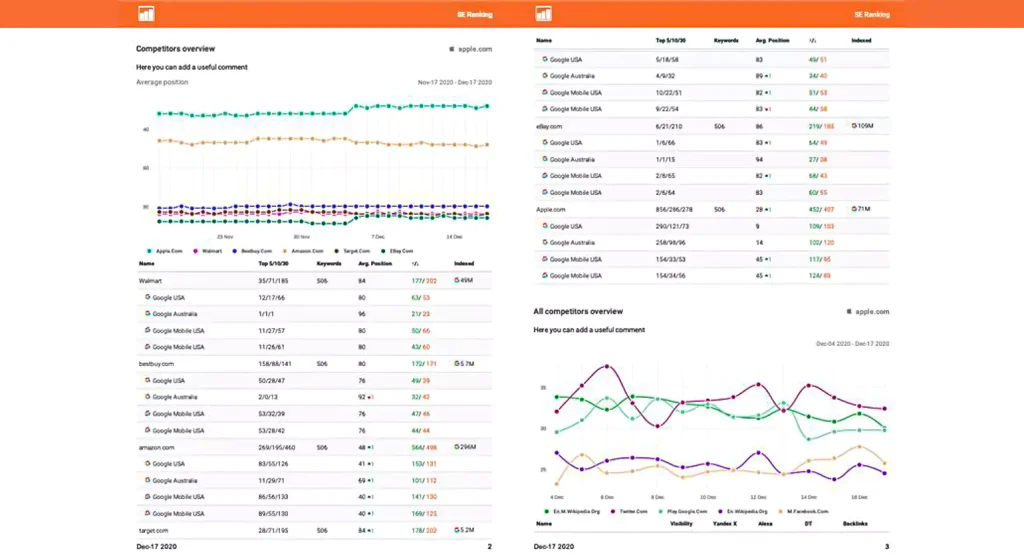
One standout tool is the SE Ranking. Their automated SEO reporting tool allows you to create unlimited SEO report templates tailored to the specific needs of each client. You can manually send these reports or schedule automatic deliveries straight to your clients’ inboxes, ensuring they receive timely updates without any extra effort on your part.
Additionally, you can grant clients free access to SE Ranking tools via a guest link, sharing live SEO rank reports, brand SERP insights, on-page reports, and more. This flexibility lets you decide the level of detail to include, customizing the experience for each client’s preferences.
Role of Virtual Assistants in SEO Report Automation
Virtual assistants play a pivotal role in automating SEO reports and streamlining processes that would otherwise be time-consuming. Connecting your data sources to Looker Studio can further enhance reporting automation by visualizing SEO metrics in real-time dashboards. There are different types of virtual assistants used in SEO:
- AI-powered tools. These include software like Google Analytics and SE Ranking. They can automatically gather and analyze SEO data. They can be integrated with automation platforms to pull relevant metrics regularly.
- Chatbots. Platforms such as Slack or Microsoft Teams can use chatbots to deliver SEO updates and reports directly to users. These bots can be programmed to fetch data from various SEO tools and provide summaries or detailed insights.
- Human virtual assistants. These are remote professionals who can manage and oversee the automation process. They set up the integration between tools, customize the SEO report template, and ensure the accuracy of the data being reported.
By leveraging virtual assistants, businesses can ensure that their automated SEO reporting is efficient, accurate, and timely.
Step-by-Step Guide to Automate SEO Report Generation
Many people don’t know where to start when they need to set up the creation of automated SEO reporting. There is nothing complicated about it, and the whole process consists of 4 steps. Here’s a step-by-step guide to get you started.
Identifying Reporting Needs
Before jumping into automation, it’s crucial to define what you need from your reports. Start by pinpointing the metrics and SEO KPIs that are most relevant to your business. Common metrics include:
- Organic traffic;
- Keyword rankings;
- Backlinks;
- Conversion rates.
Decide reporting frequency: daily, weekly, monthly, or quarterly. This helps in setting a clear foundation for your automation process.
Setting Up the Automation Process
The next step is integrating your SEO tools with virtual assistants or automation software. Tools like Google Analytics can be linked with automation platforms such as Zapier or Integromat.
Configure the data collection parameters to pull in the necessary metrics. For example, set up API connections to fetch keyword ranking data every week or organic traffic stats daily. Ensure your automation setup covers all your identified reporting needs.
Creating Templates and Custom Reports
With the data collection process in place, focus on designing your report templates. These templates should be aligned with your business objectives and stakeholder requirements.
Customize the automated SEO report to cater to different audiences. Executives might prefer high-level summaries with key insights, while marketing teams might need detailed reports with granular data.
Scheduling and Distribution
The final step is to automate the scheduling and distribution of these reports. Set up your automation tool to generate reports at your defined frequency. For instance, schedule a monthly SEO performance report to be created on the first day of each month.
Next, establish automated distribution channels. You can set up email workflows to send these reports directly to stakeholders’ inboxes. Alternatively, cloud storage solutions like Google Drive or Dropbox can be used to share reports through shared folders or dashboards.
Future Trends in SEO Report Automation
Advanced AI and machine learning are at the forefront. They offer the ability to analyze vast amounts of data more efficiently and accurately than ever before. These technologies can identify patterns and trends that humans might miss, resulting in deeper insights.
In the near future, virtual assistants will likely play a more central role in digital marketing. The continuous development of AI and machine learning will further amplify their capabilities, driving more efficient and impactful SEO report automation.
Summary
Clients want to see results, analysis, and plans, even in the case of white-label SEO. Be sure to purchase an automated SEO reporting tool that is easy to use and allows you to share results instantly, so optimizers can be sure their hard work is understood and appreciated. With those tools, you can easily track and analyze all your SEO data in one interface and quickly share it with clients at your convenience and in a convenient format.














