Table of Contents
Key Takeaways
- A proper audit systematically identifies spend leaks so you can reallocate that money into campaigns that actually drive sales and leads.
- Conversion tracking errors are the single biggest cause of bad decision-making in paid search because if you measure the wrong thing, you will optimize for the wrong thing every single time without realizing it.
- Regular deep dives into the search terms report prevent you from paying for clicks from people who were never going to buy from you in the first place.
- The speed and relevance of your landing pages directly impact your Quality Score, which means faster pages actually lower the amount you pay for each click over time.
How to Conduct a Google Ads Audit?
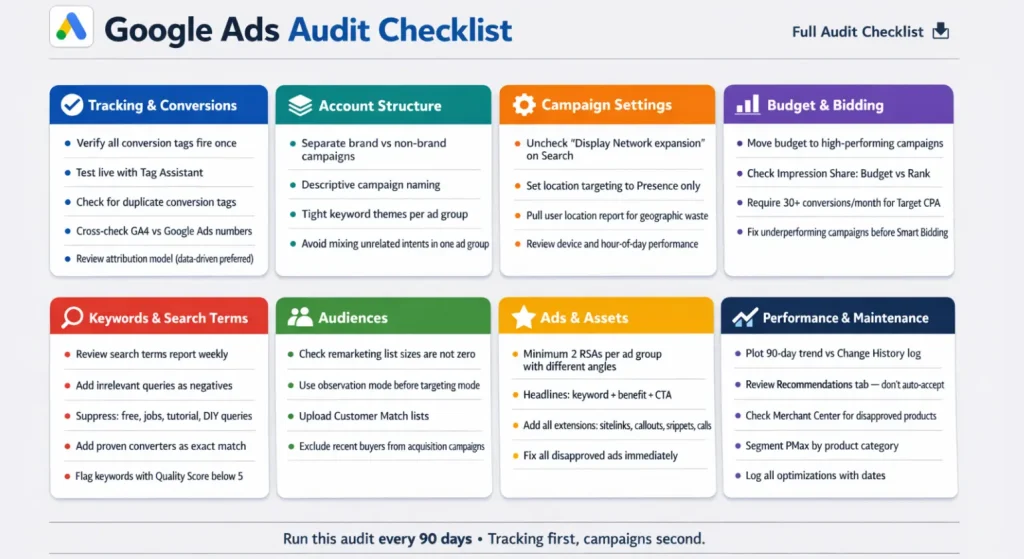
Most marketers run a google ads audit by pulling a few reports, glancing at click-through rate, and calling it done. That approach misses where the real money is actually leaking. The wasted budget in almost every account hides inside settings that nobody ever opens, tracking configurations that silently inflate conversion counts, and search terms that have been burning spend for months without anyone noticing.
A proper google ads account audit needs a repeatable system, not a gut feeling. We built a comprehensive Google Ads audit checklist template for this exact purpose. It is meant to be used while you are live inside the account, walking through each section in a fixed order so nothing gets skipped. This is also not a one-time exercise. Running through a full google ads audit every ninety days is the minimum cadence because the platform changes, competitors shift strategies, and your own performance data changes as you add new keywords and creatives.
Business and Tracking
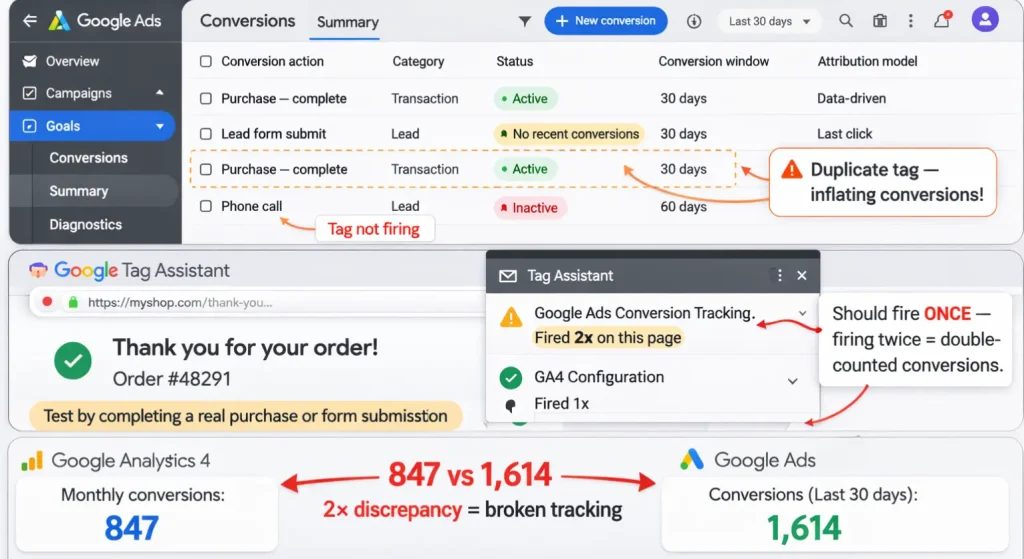
The most important rule of any google adwords audit is to start with tracking, not campaigns. If your conversion data is wrong, every optimization decision downstream is also wrong. Before touching anything else, open the Conversions page inside Google Ads and read the status column for every single action listed. A tag that has not fired recently is not tracking, regardless of how it was set up.
The best way to verify tracking is live testing. Install the Google Tag Assistant Chrome extension, go to your own site, and complete a real form submission or purchase. Watch whether the tag fires exactly once at the right step.
Duplicate conversion tags are one of the most common problems in any paid search audit because they silently double your reported conversions while your actual revenue stays flat. Two tags tracking the same purchase will make your cost per acquisition look outstanding while your client or boss wonders why sales numbers never match the platform.
Linking GA4 to Google Ads, following Google’s official linking guidelines, is another step that people assume is already handled but frequently is not. A quick cross-check between GA4 monthly conversions and Google Ads reported conversions will tell you immediately whether something is off. Attribution model is also worth reviewing here. Last-click attribution undervalues upper funnel campaigns and a data-driven model is more accurate for accounts with sufficient volume. Check what you are currently running and make sure it matches your actual sales cycle.
Account Structure
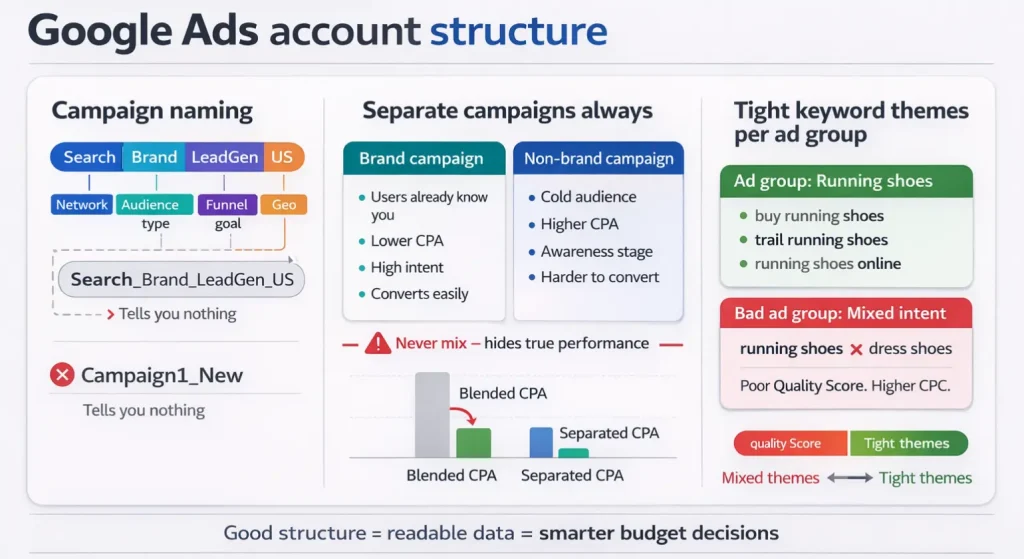
Poor structure is one of the biggest hidden costs in any Google Ads account audit because bad organization makes performance data unreadable. When campaigns and ad groups are set up vaguely, you cannot tell what is actually working. A campaign named Search_Brand_LeadGen_US tells you the network, goal, funnel intent, and geography at a glance. A campaign named Campaign1_New tells you absolutely nothing.
Brand and non-brand keywords must live in separate campaigns.
- Brand searches come from people who already know your business and naturally convert at lower cost.
- Non-brand searches come from cold strangers, which is a completely different challenge.
Mixing them hides how each is actually performing and makes it impossible to allocate budget smartly. Inside ad groups, keep keyword themes tight. Running shoes and dress shoes do not belong in the same ad group because the ads cannot match both intents well, which hurts Quality Score and drives up your cost per click.
Campaign Settings
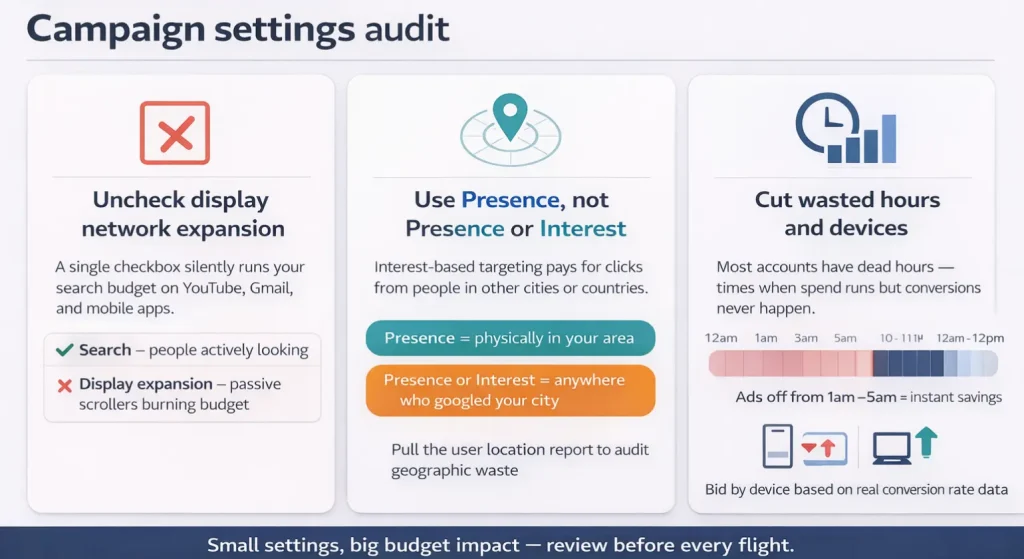
Campaign settings are where the expensive mistakes hide. A search campaign that has Include Google Display Network accidentally checked is quietly running text and digital banner display ads on YouTube, Gmail, and random mobile apps where nobody is actively searching. This single checkbox can drain a significant portion of your budget without any obvious signal in performance reports.
Location targeting is another setting that is frequently wrong. Most local and regional businesses should use the Presence setting so ads only show to people physically located in the target area. The Presence or Interest setting will show your ads to anyone who has searched for or shown interest in that location, which often means you are paying for irrelevant clicks from people in other cities or countries. After fixing the setting, pull the user location report and compare actual spend against your service areas to catch any geographic waste that built up before the fix.
Device and schedule performance deserve their own review. Pulling a performance report segmented by hour of day often reveals windows where conversions almost never happen. Turning off ads at two in the morning or adjusting bids on mobile devices based on real conversion rate data are low-effort improvements that compound over time.
Budget and Bidding
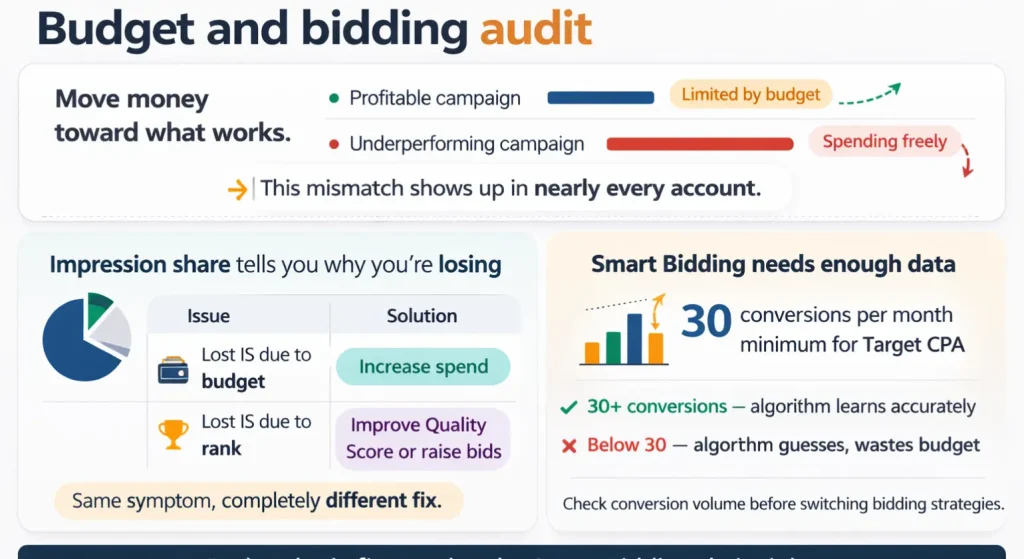
Budget allocation is where logic often breaks down in Google Ads management, even when utilizing advanced advertising management tools. Profitable campaigns sitting on Limited by budget status while underperforming campaigns spend freely is a pattern that shows up in nearly every google ads audit. The fix is straightforward: move money toward what works and reduce or pause what does not.
Impression share data is the clearest diagnostic tool for bidding decisions.
- Lost impression share due to budget means you need more spend in that campaign.
- Lost impression share due to rank means your Quality Score or bids are not competitive enough.
These two causes require completely different solutions, which is why checking this column matters. Smart Bidding strategies also need adequate conversion volume to function properly. Thirty conversions per month is a realistic minimum for Target CPA campaigns. Below that threshold, the algorithm makes poorly informed guesses and often wastes the budget trying to learn.
Keywords and Search Terms
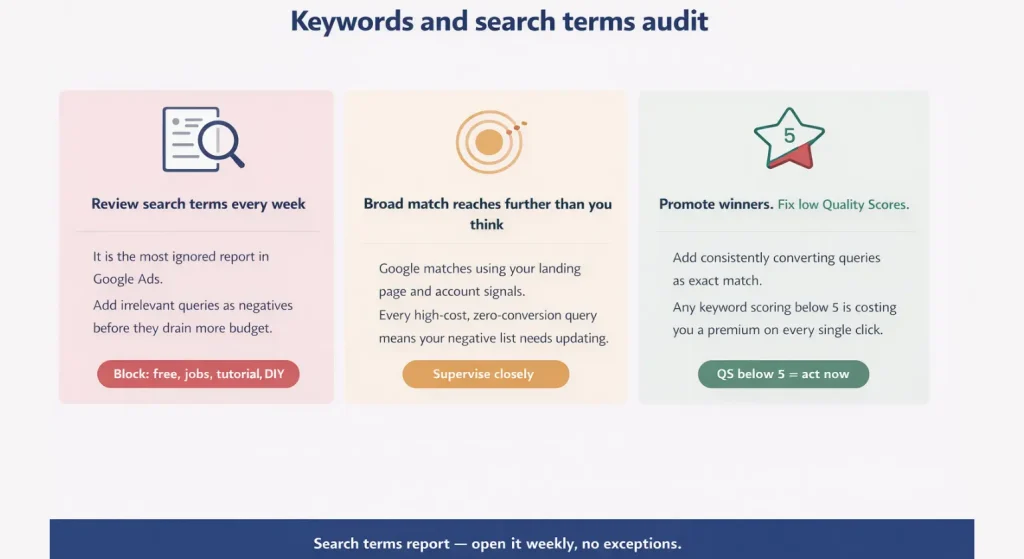
The search terms report is the most important report in the entire account and also the most consistently ignored. Reviewing it weekly and adding irrelevant queries as negative keywords is the single highest leverage habit any PPC manager or ad operations specialist can build. Searches containing words like free, job, tutorial, and DIY frequently appear in lead gen and service accounts, draining spend on traffic that will never convert.
Broad match keywords in particular need close supervision because Google now uses landing page content and account signals to match queries, which means the reach is far wider than most advertisers expect. Every high-cost, zero-conversion query in your search terms report is a signal that your negative keyword library needs updating.
On the other side, searches that convert consistently at a good cost should be added as exact match keywords so you can bid more aggressively on proven terms. Quality Score below 5 on any high-spend keyword is also a direct cost problem, since low Quality Score means you are paying a premium on every single click for that term.
Audiences
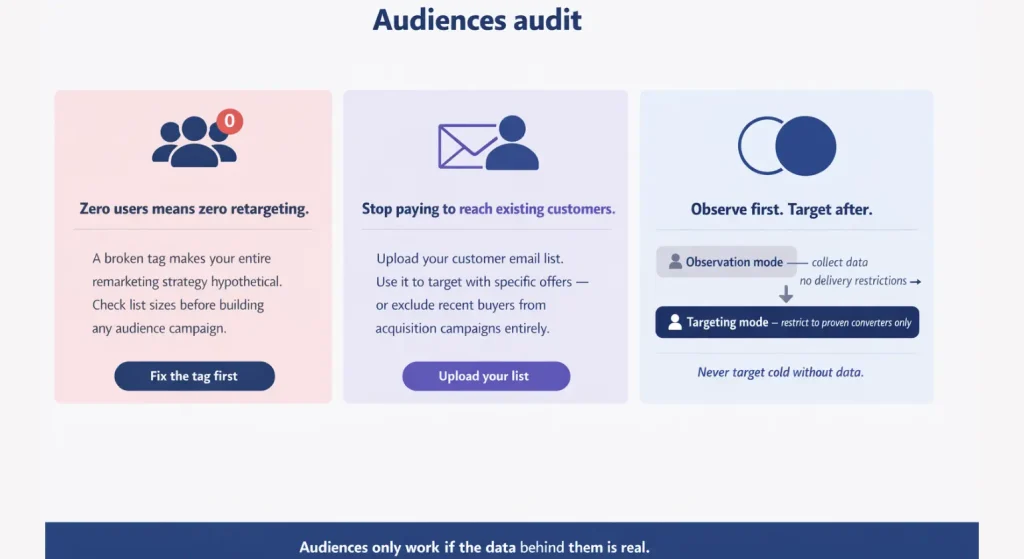
Remarketing lists that show zero users are a surprisingly common problem. If the tag is broken, your entire retargeting strategy is hypothetical. Checking list sizes before building any audience-based campaigns is a basic step that saves significant budget. Customer Match lists offer additional targeting power by letting you upload existing customer emails to either target them with specific offers or exclude them from acquisition campaigns entirely. There is no reason to pay to reach someone who already bought from you last week.
Extensions are free real estate. Sitelinks, callouts, structured snippets, and call assets all make your ads larger and more useful without increasing your cost per click. An account missing these assets is visually smaller than competitors who use them, which directly hurts click-through rate.
Disapproved ads should also be addressed immediately since they cannot show and silently reduce your effective coverage.
Landing Pages, Shopping and PMax
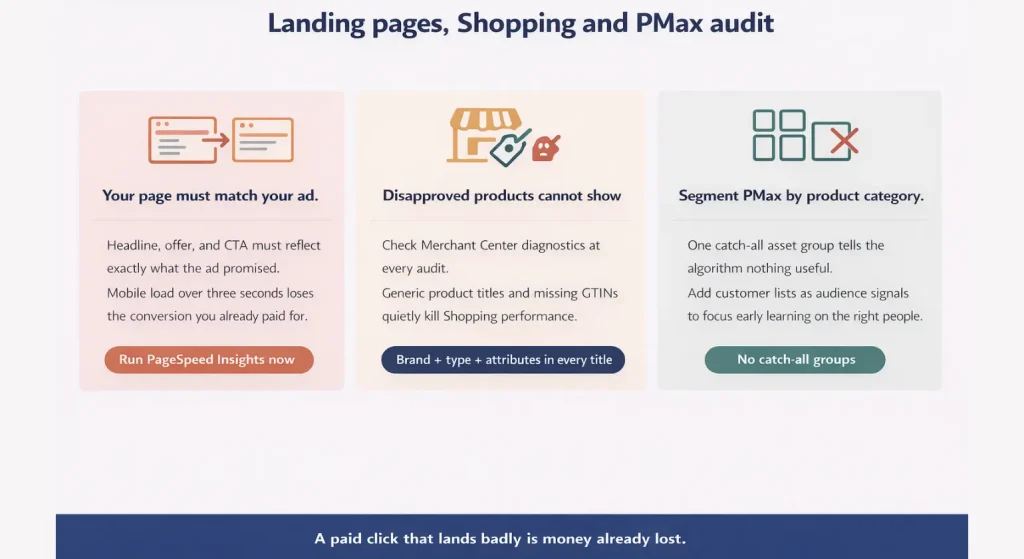
A landing page that does not match the ad is one of the fastest ways to lose a conversion that you already paid for. The headline, offer, and call to action on the page need to directly reflect what the ad promised. Page speed matters just as much. A mobile load time over three seconds costs conversions in a measurable and documented way. Google PageSpeed Insights gives you a free, detailed breakdown of exactly what to fix.
For Shopping campaigns, Merchant Center diagnostics should be checked at every google ads audit. Disapproved products cannot show in results. Product titles with generic names or missing GTINs perform poorly compared to titles built with brand, product type, and key attributes. Performance Max campaigns need asset groups segmented by product category rather than one large catch-all group. Adding customer lists as audience signals also helps the algorithm focus early learning on the right people rather than running broad.
Performance and Maintenance
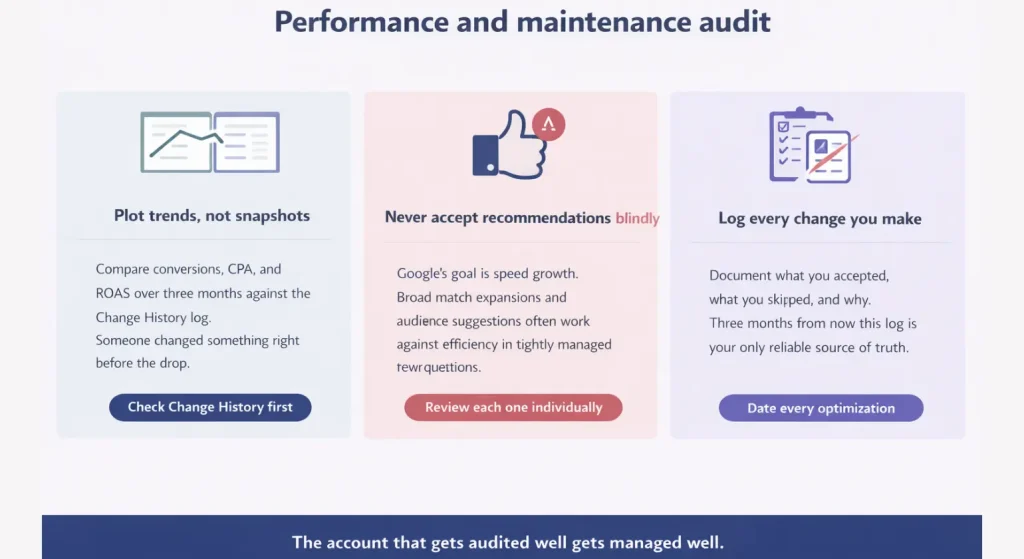
Trend analysis matters more than point-in-time snapshots. Plotting conversions, CPA, and ROAS across three months and comparing those lines against the Change History log is how you identify what actually caused a performance shift. Someone usually changed something right before the drop, and the Change History makes that visible.
The Recommendations tab is useful but should never be accepted blindly. Google’s goal is spend growth and some recommendations, like adding broad match keywords or expanding audiences, work against efficiency in tightly managed accounts. Review each one individually and document which you accepted, which you skipped, and why. Keeping a log of all optimizations made with dates is also one of the most underrated habits in Google Ads management. When you need to explain a performance change three months from now, that document is the only reliable source of truth.
Conclusion
A google ads audit done properly is a competitive advantage. While most advertisers stare at surface metrics and occasionally adjust bids, a structured review of tracking, structure, settings, keywords, and landing pages finds the real problems and solves them systematically. The accounts that outperform over time are not running smarter creatives. They have accurate data, clean structure, and a disciplined review process that runs every ninety days without exception. Fix the critical items first, then work through the full checklist. The improvements compound.
FAQs
1. How often should I run a Google Ads audit to keep my account healthy?
You should conduct a full audit at least once every ninety days to catch issues before they waste too much budget. For accounts spending more than ten thousand dollars per month, a lighter monthly check of tracking and search terms is also recommended to stay on top of performance shifts.
2. What is the most common mistake that wastes money in Google Ads accounts?
Conversion tracking errors are by far the most common and most expensive mistake. Duplicate tags that double count conversions or broken tags that record nothing lead to optimization decisions based on completely wrong data, which wastes every dollar you spend until the tracking is fixed.
3. Does it cost money to have someone audit my Google Ads account for me?
You can absolutely audit your own account for free using a detailed checklist like the one referenced in this article. If you hire an agency or consultant to do it for you, you can expect to pay anywhere from five hundred to two thousand dollars depending on how complex your account structure is and how much historical data needs to be analyzed.
4. Why is my Quality Score low even though I think my ads are good?
Low Quality Scores almost always come from either ad relevance issues or poor landing page experience. Your ads might not match the keywords closely enough, or your landing page might load too slowly and not contain the information the searcher is looking for based on their query.
5. How do I quickly find where my Google Ads budget is being wasted?
Check tracking first to ensure conversions aren’t inflated or missing, then review your search terms report for irrelevant queries, and fix campaign settings like Display expansion or wrong location targeting—these are the most common sources of hidden wasted spend.