Table of Contents
To get your business ready for modern data privacy laws and keep your documents safe, you need a clear plan based on five main steps: list all the personal data you hold, reduce data collection to what you truly need, protect that data with strong encryption and access controls, safely get rid of old records, and prepare a written incident response plan.
In today’s regulatory environment, compliance is a basic business need that protects you from large fines and builds real trust with your customers.
By figuring out which laws apply where you operate, using “privacy by design,” and building a sense of responsibility across your team, you can turn data protection from a legal headache into a real business strength.
Data is often called the new oil, and how companies handle this risky asset now plays a big role in their long-term success. As of February 23, 2026, privacy rules around the world have become much more complicated, with different regions creating their own laws.
For many small and mid-sized companies, moving from casual data use to a strict compliance program can feel overwhelming. Modern tools like enterprise cloud storage can help by storing and protecting sensitive files in one secure place, giving you a strong base for your privacy work.
This article looks closely at data privacy and gives a clear guide for protecting both digital and paper records while staying compliant.
What Are Data Privacy Laws and Why Do They Matter to Businesses?

Data privacy laws, also called information privacy laws, are legal rules that control how organizations collect, use, store, and share personally identifiable information (PII). These laws are based on the duty to protect a person’s right to control their own data.
For businesses, they act like traffic rules for handling customers’ and employees’ names, Social Security numbers, payment details, and even browsing history. Without these rules, personal data would be easy pickings for criminals, leading to large-scale identity theft and financial harm.
Beyond ethics, these laws matter because the price of getting them wrong keeps going up. Large enforcement actions, like the €1.2 billion fine against Meta in 2023, are clear warning signs.
For smaller firms, even a modest fine can be devastating. Poor data handling also damages customer trust.
People today pay attention to privacy and prefer brands they can trust with their information. A strong privacy program protects you from regulators and also helps build customer loyalty and better data quality.
How Data Privacy Laws Affect Day-to-Day Operations
Privacy laws change how a business runs every day. They move data management out of a back-room IT issue and make it a leadership responsibility. For example, marketing teams can no longer collect all possible data “just in case.”
Each data point must have a clear, valid purpose. This often means new user screens for clear consent and automated tools for handling “Right to Be Forgotten” or deletion requests.
Every department-from HR to Sales-needs to understand the data life cycle. When you hire someone, their personal details must follow strict rules. When you get a sales lead, you must confirm they agreed to hear from you.
These steps can slow some activities at first, but they lead to cleaner data. Removing redundant, obsolete, and trivial (ROT) data cuts storage costs and improves the quality of analytics, which supports better business decisions.
What Is the Difference Between Data Privacy and Data Security?
People often mix up data privacy and data security, but they are different, even though they work together as part of data protection.
Think of data security as the fortress: walls, guards, and locks. It covers the technical systems and tools that stop outsiders and insiders from accessing, stealing, or destroying data. Firewalls, multi-factor authentication (MFA), and anti-malware tools are signs of a strong security setup.
Data privacy is more like the rulebook for the fortress. It decides who may enter and what they can do with the data. It deals with the legal and ethical use of information. You might have excellent technical security, but if you share customer data without consent, you are still breaking privacy rules. On the other hand, you might have good privacy policies, but if your database is unencrypted and easy to hack, your security has failed.
To comply properly, a business needs both: strong security to protect data and solid privacy rules to control its use.
Which Data Privacy Laws Could Apply to Your Business?
The starting point for compliance is to find out which laws apply to your company. This can be tricky because many regulations have “extraterritorial reach,” meaning they can apply even if your business is not located where the law was passed.
For example, a New York company serving customers in Berlin must follow European rules. The main factors are where you are based, where your customers live, and what industry you are in.
Ignoring these rules is a big risk. In the United States, the lack of one single federal privacy law means there is a mix of state laws instead. Many businesses try to follow the strictest rule that applies to them so they are covered in all regions.
Implementing privacy-focused tools such as enterprise cloud storage can simplify this process. Similarly, building your program around broad frameworks like the GDPR often means you already meet the needs of lighter laws and just need small changes to be fully compliant.
Global, National, and Local Data Privacy Regulations
Globally, the General Data Protection Regulation (GDPR) is still viewed as the leading standard. Since 2018, it has shaped many other privacy laws around the world.
In the U.S., there is no direct national counterpart, but there are narrow federal laws in specific areas. These include the Gramm-Leach-Bliley Act (GLBA) for financial companies and the Fair Credit Reporting Act (FCRA). The Federal Trade Commission (FTC) also uses its power against “unfair or deceptive” practices to enforce reasonable security expectations, even when other laws are less clear.
On the state level, California took the lead with the California Consumer Privacy Act (CCPA) and later the California Privacy Rights Act (CPRA). Other states, like New York with its 23 NYCRR 500 rule for financial firms, have followed. Some cities and local bodies also set standards.
For companies, “taking stock” means looking not only at your servers but also at a map of where your customers live, so you know which rules cover which people.
Major Examples: GDPR, CCPA, HIPAA, and Other Frameworks
To move through this legal landscape, it helps to know the basic ideas behind the main frameworks.
The GDPR is based on seven principles: lawfulness, purpose limitation, data minimization, accuracy, storage limitation, integrity, and accountability. It usually requires “opt-in” consent for data use.
The CCPA/CPRA stresses the “Right to Know” and the “Right to Opt-Out” of the sale or sharing of personal information. It uses an opt-out model but still demands clear notices and strong rights for individuals.
Some laws focus on certain industries. The Health Insurance Portability and Accountability Act (HIPAA) sets strict rules for any group handling medical data, including clinics, insurers, and their service providers like billing firms. The Children’s Online Privacy Protection Act (COPPA) protects data of children under 13.
If your website or app attracts young users, the FTC requires parental consent and special privacy rules for them. These differences matter: a HIPAA issue is handled differently and may carry other penalties than a standard CCPA case.
How to Identify the Data Your Business Collects and Processes
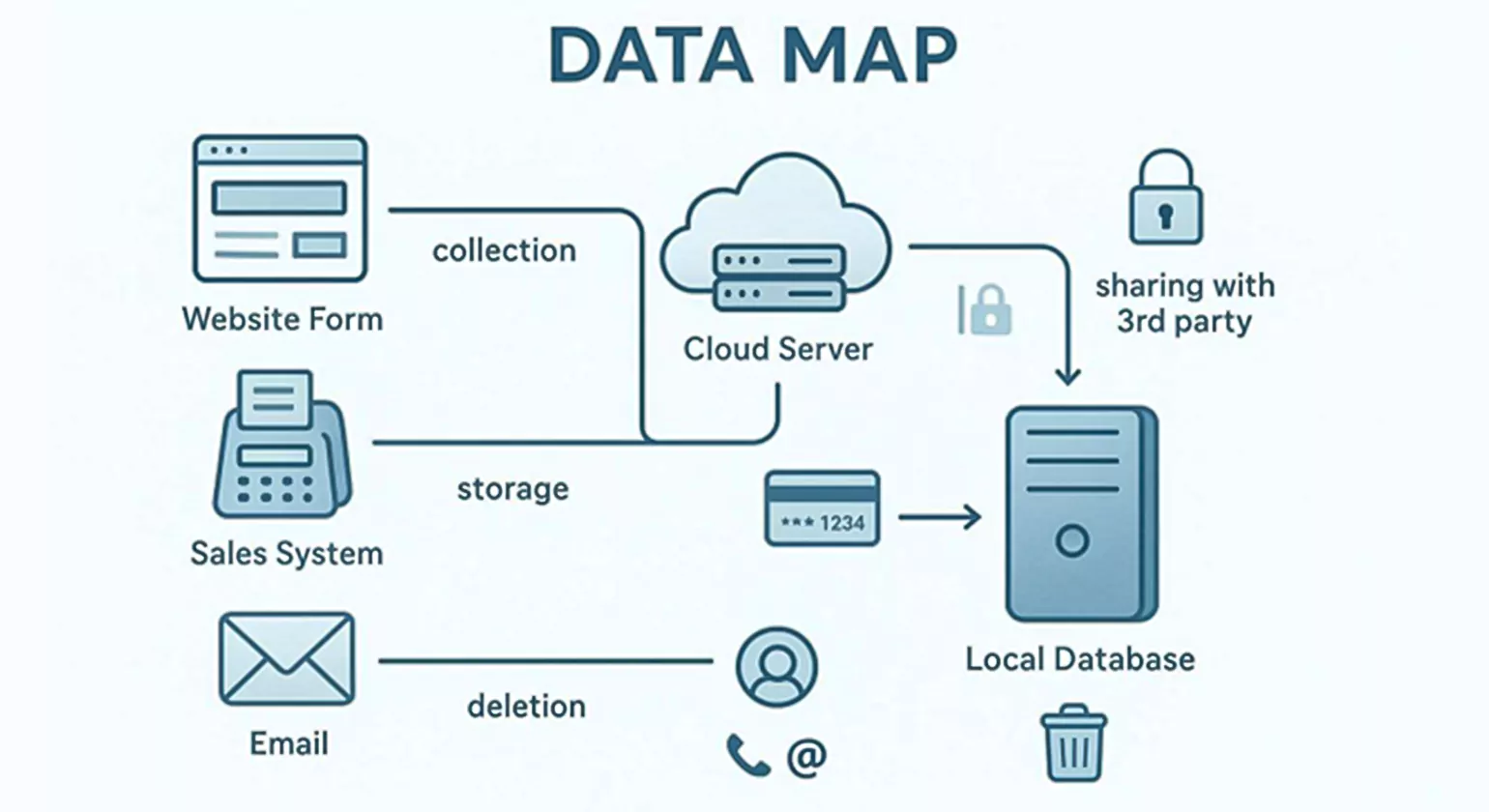
You cannot protect data you do not know you have. Good data security starts with a careful review of the information your business holds and who can see it. Most companies store personal data such as names, Social Security numbers, credit card details, and bank account numbers for customers or staff. This is often needed to run payroll or process orders, but it becomes a serious risk if managed poorly.
To identify this data, trace how information enters, moves through, and leaves your company. Talk to your sales team, IT staff, HR department, and accounting team. Speak with outside providers that handle data for you. By understanding this flow, you can find weak spots and locate your most sensitive data “crown jewels.”
Defining Types of Personal and Sensitive Data
Different types of data carry different levels of risk. Personally Identifiable Information (PII) is any data that can be tied to a specific person, like a name, address, or username.
“Sensitive Personal Information” is a smaller category that needs extra protection. This includes genetic data, biometric details (like fingerprints or face scans), exact GPS locations, gender identity, and health records.
If this type of data leaks, the chance of identity theft or similar harm is much higher.
Keep in mind that data that seems anonymous can become identifiable when combined with other details. Research shows that 87% of people in the U.S. can be identified with just their birthdate, gender, and ZIP code. So when classifying data, do not only focus on obvious identifiers.
Any detail that helps create a unique profile should be handled carefully and, where possible, de-identified or pseudonymized to reduce risk.
Data Mapping, Inventory, and Record of Processing Activities (RoPA)
A data map is a detailed document that shows where personal data is collected, where it is stored, who it is shared with, and how it is used. Under the GDPR, this closely connects with the “Record of Processing Activities” (RoPA). A proper inventory must check everywhere: main databases, staff laptops, home computers used for work, USB drives, and even digital copiers.
Many businesses forget that digital copiers have hard drives that keep copies of every scanned or emailed document.
Building this map helps you truly “Take Stock.” It should list every entry point-websites, email inboxes, point-of-sale systems-and every storage place, including cloud services and paper archives.
Once finished, the map shows how data moves in both directions across your systems. This is key for handling rights requests; when someone asks you to delete their data, you need to know every location it sits in to comply properly.
What Key Principles Should Guide Your Data Privacy Compliance?
Even though privacy laws differ, most modern programs are built on a small set of core ideas that guide fair and safe data use. These ideas help make compliance part of your values, not just a box-ticking job.
Strong security plans usually cover four areas: physical security, electronic security, employee training, and the security practices of outside partners. Following these ideas builds “Privacy by Design,” where protection is included from the start of every project.
Working with these principles also helps you show regulators that you are acting in good faith. Even if you are not fully aligned with a new law on day one, showing that you have a plan based on accepted best practices can reduce your risk. It signals that you take accountability and transparency seriously, which authorities consider when setting penalties after a breach.
Transparency, Consent, and Purpose Limitation
Transparency is the base of trust. You must clearly tell people what data you collect and why. This usually appears in a privacy policy, which you should review and update at least once a year.
Consent must be freely given, specific, informed, and clear. Under the GDPR, this often means ticking a box or another obvious action. Under the CCPA, it includes easy-to-find opt-out links that actually stop all tracking when used.
Purpose limitation means you only use data for the reason you stated. If you collect an email address only to send a receipt, you cannot later use it for marketing without new consent. This rule stops “function creep,” where data collected for one simple reason ends up used in a way the user never expected or approved.
Sticking to your stated purpose is one of the best ways to keep customer trust.
Data Minimization and Retention Policies
One of the safest ways to protect data is to hold as little of it as possible. Data minimization means you only collect the smallest amount needed to do the job. If you do not truly need a Social Security number, do not ask for it.
You should also “Scale Down” staff access based on the “least privilege” idea-each person gets access only to the data they need for their role.
A clear data retention policy helps you avoid keeping information longer than you need. Once you no longer have a business reason to keep certain data, you should “Pitch It.” Holding onto old data raises the chance of fraud and identity theft.
A written policy should say what to keep, how to protect it, and exactly when and how to destroy it. Data that does not exist in your systems cannot be stolen.
Upholding Data Subject Rights
Modern privacy laws give people certain rights over their personal data. These usually include the right to access their data, correct errors, delete their information (the “Right to Erasure”), and receive a copy in a usable format (data portability).
Businesses need a reliable Data Subject Access Request (DSAR) process to handle these within legal deadlines, often 30 to 45 days.
A self-service portal can make these requests easier to manage, especially at scale. Automation helps larger organizations respond on time. Remember that in many places, employees and business partners also have these rights.
Because employee records often contain very sensitive information, a strong DSAR process for internal data is just as important as the one for customer data.
What Steps Can Businesses Take to Secure Documentation and Digital Records?
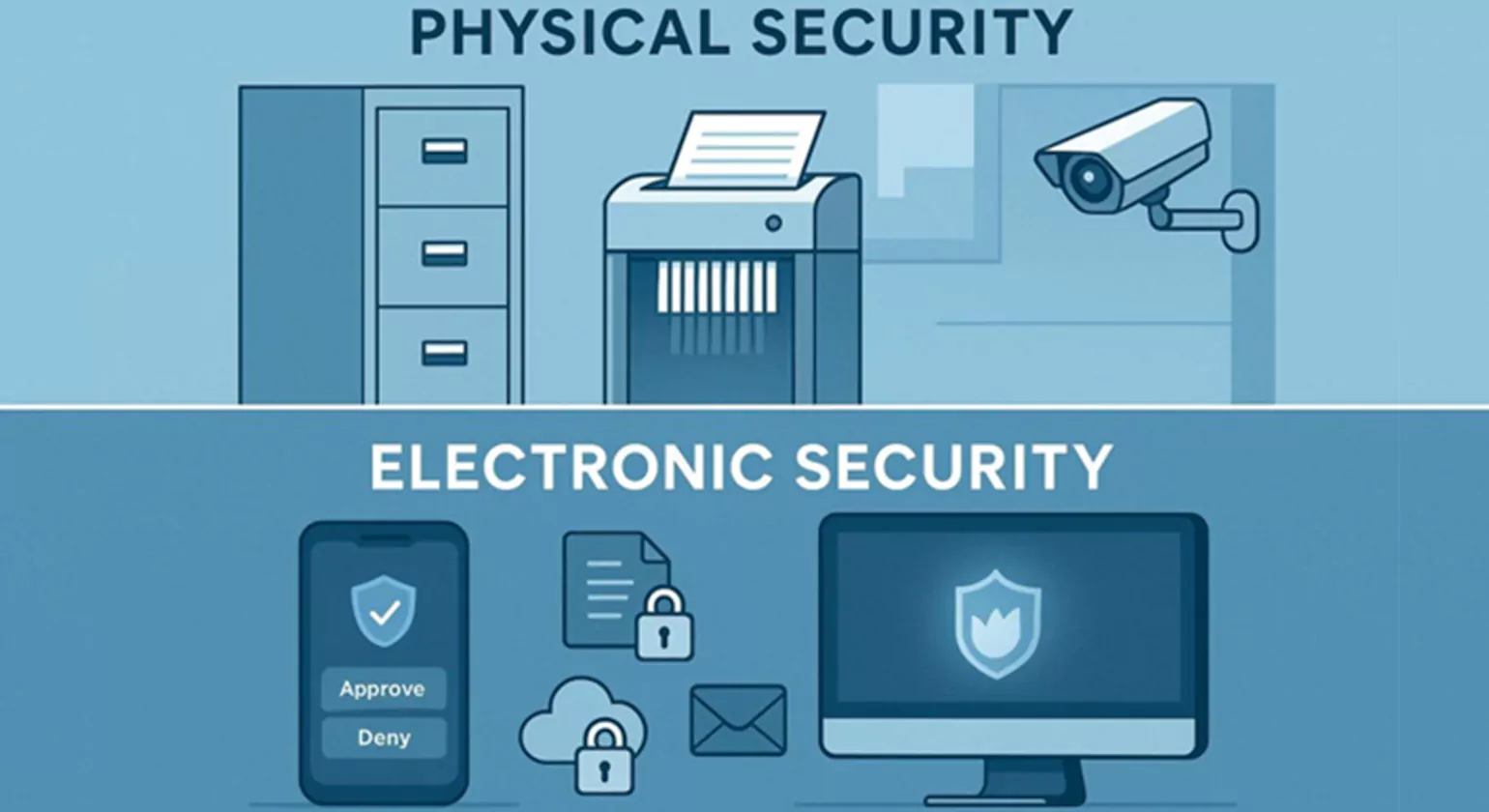
Protecting documentation means dealing with both paper and electronic records. Many data leaks still happen the old way-through lost, stolen, or discarded paper files. Simple measures like locked doors and alert staff can stop many incidents.
For digital records, the focus is on encryption and network defenses. You must know all the ways your systems connect to networks-internet access, Wi-Fi, mobile devices, and scanners.
The strength of your security program depends on how well you find and fix weak spots. This may be as simple as having a skilled staff member run standard security tools, or as involved as bringing in outside experts to run a full audit. No matter your size, avoid keeping sensitive customer data on any internet-connected device unless it is truly necessary to run your business.
Physical and Electronic Security Controls
Physical security includes simple habits and equipment. Store paper files, USB drives, and backups in locked rooms or cabinets. Only allow staff with a genuine “need to know” to access them. Track who has keys and how many exist. Encourage a “clean desk” policy where employees store files and lock computers when leaving. Small touches, like securing payment terminals so they cannot be swapped out by thieves, can block common attacks.
Electronic controls are more technical. Use firewalls to shield your network, especially at the edge where your systems meet the public internet. Run anti-malware software regularly on all devices and servers. Limit staff ability to install software on their own, since that is a common way for malware to enter. Scan your network to find unnecessary open services and close them so attackers have fewer paths in.
Access, Authentication, and Encryption Best Practices
Control access by requiring strong passwords-long and hard to guess, with a mix of characters. More importantly, use multi-factor authentication (MFA). MFA asks for a second proof of identity, like a code sent by text or generated by an app. This makes it much harder for hackers to break in, even if they steal a password. Use password-locked screen savers to secure idle computers and set lockouts after repeated failed login attempts.
Encryption is your final safety net. It scrambles readable information so it can only be read with the correct key. Encrypt sensitive data both “at rest” (on hard drives) and “in transit” (while being sent over networks). Use common standards like AES-256 for storage and TLS 1.3 for data in motion. If someone steals a laptop that has full-disk encryption, they cannot read the contents without the key.
Securing Laptops, Mobile Devices, and Digital Copiers
Laptops and mobile devices are easy to lose or steal, so they carry more risk. Limit their use to staff who truly need them, and think carefully about whether sensitive data must be stored on the device itself.
If possible, treat the laptop as a window into a secure server rather than a storage place. Use cable locks to secure laptops at desks. When devices are retired, use wiping tools to overwrite all data-simple deletion is not enough.
Digital copiers are often overlooked. Their hard drives store images of all documents they handle. When you buy or lease a copier, make sure it includes security options like encryption and automatic overwriting.
Make a routine of overwriting the copier’s drive at least once a month. When a lease ends, have a technician remove and destroy the drive or confirm it has been fully wiped before the device leaves your control.
Using Firewalls and Safe Remote Access Protocols
As remote work becomes more common, safe remote access is key. Staff working from home should use a Virtual Private Network (VPN) and MFA to connect. Configure firewalls so that only trusted devices and users can access your systems. Review these settings regularly so they do not become too relaxed over time. For Wi-Fi, use WPA2 or WPA3 encryption to stop people nearby from snooping on your traffic.
How Should You Manage Data with Third-Party Vendors and Service Providers?
Your overall security depends heavily on your partners. Before outsourcing tasks like payroll, hosting, or data processing, carefully check the provider’s security practices and compare them to your own standards. When possible, visit their offices or data centers. You are usually responsible, both by contract and by law, for how they handle the data you share, so a simple promise from them is not enough.
Partnerships can be dangerous if the provider has weak security. Many high-profile breaches start with a smaller contractor whose systems are easier to break into. By checking partners thoroughly at the start and over time, you protect your reputation and lower the chance of being part of a supply-chain breach.
Data Processing Agreements and Compliance Checks
Once you pick a vendor, put your security rules in writing. A Data Processing Agreement (DPA) or contract add-on is required under laws like the GDPR and CCPA. It should clearly state how the vendor will protect data, what they are allowed to do with it, and their duty to tell you quickly about any security issues-even if they are minor. Talk about these points while signing the contract; it is much harder to add them later.
Assessing the Security Practices of Partners
Ongoing checks are key. Build a checklist for reviewing third-party practices and carry out regular reviews or audits. Some companies rate vendors with “Vendor Scores” based on privacy and security. If a vendor’s score falls or they refuse to share independent audit results (for example, a SOC 2 report), you may need to rethink the partnership. If they mishandle your customers’ PII, regulators and customers will still see it as your problem.
What Are Effective Procedures for Data Retention and Disposal?

Safe disposal is as important as safe storage. What looks like simple trash to you could be a gold mine for identity thieves. Throwing credit card slips or discs with personal data into a dumpster invites fraud and lawsuits. Having clear disposal practices helps ensure sensitive data cannot be read or put back together by outsiders.
The right disposal method depends on how sensitive the data is and what tools you have. For paper, this usually means shredding, burning, or pulverizing. For digital media, it means using wiping tools that overwrite the whole drive.
Clicking “Delete” or emptying the “Recycle Bin” does not truly erase data; it only marks space as usable. A skilled attacker can often recover files unless they have been overwritten.
Establishing Data Retention Schedules
A data retention schedule states how long you keep different types of data and how you dispose of them safely. It should list each category of data, the legal reason for keeping it (for example, tax rules that require records for seven years), and the clear end date for retention.
Automating these rules helps prevent data from piling up and turning into extra risk. It also reduces ROT data, which can be a large share of what many companies store.
Proper Disposal and Deletion of Obsolete Information
Place shredders in handy spots around the office, especially next to printers and copiers. For electronic devices, use low-cost wiping software before discarding old computers, phones, or USB sticks.
If you use consumer credit reports, you may fall under the FTC’s Disposal Rule, which has specific destruction requirements. Make sure remote workers follow the same disposal rules; a sensitive document thrown into a home trash can is just as risky as one tossed out at the office.
How to Prepare for and Respond to Data Breaches or Security Incidents
Even with strong controls, breaches can still occur. The difference between a minor event and a serious crisis often comes down to how good your Incident Response Plan is. A clear plan limits the damage to your business, your staff, and your customers. It lets you respond in a calm, structured way instead of reacting on the fly.
Assign a senior person to lead the response effort. If a machine appears to be compromised, disconnect it from the network at once to stop attackers from spreading further. Investigate to find and close weak points and to learn what data was affected. You also need to handle notice requirements; many laws force you to tell affected people and regulators within a short time frame, such as the GDPR’s 72-hour deadline.
Incident Response Planning
Your plan should clearly define what counts as a serious incident and list who is responsible for each part of the response. Prepare templates for notifying customers, partners, and authorities so you are not writing them under pressure. The plan should also cover how to collect and preserve logs and other evidence to find the cause. Regular practice sessions or “tabletop exercises” help make sure everyone knows their role.
Detecting Breaches and Managing Notifications
To spot breaches, think about using an Intrusion Detection System (IDS) and keep central logs of security events. Watch both incoming traffic (for attack attempts) and outbound traffic (for large or strange data transfers). If you find a breach, work with legal counsel to move through the different state and federal notice rules. Keep records of all steps taken during the incident; these records are important to show accountability to regulators and to defend against claims later on.
What Training and Awareness Initiatives Improve Compliance?
Your data protection plan only works if your employees follow it. Human error drives many privacy failures. A careless worker leaving a laptop in a car or clicking on a “spear phishing” email can undo expensive security tools in seconds. Training your staff is one of the cheapest and most powerful ways to protect your data and reputation.
Building a “culture of security” means everyone, at every level, sees data protection as part of their job. It should not feel like a random list of IT rules, but a shared duty to protect the company and its customers. Regular training, clear messages, and visible support from leadership are key to building that culture.
Employee Training for Data Privacy and Security
Offer training on a regular schedule and adjust it to each job role. Teach staff how to spot weak points and recognize threats like phishing and voice phishing (vishing). Warn them about attackers pretending to be IT or support staff to trick them into giving passwords. Explain the reasons behind rules, such as why password sharing or sticky-note passwords are banned. Publicly acknowledge employees who report problems or potential weaknesses; this encourages active participation instead of silent compliance.
Building a Culture of Accountability and Ongoing Awareness
Include contractors, temps, and seasonal staff in security training. Hang reminders in shared areas and send short monthly updates with simple privacy and security tips. Make sure your rules cover remote workers and bring-your-own-device (BYOD) setups. Apply clear consequences for breaking policies. When staff see leadership taking security seriously, they are much more likely to follow the rules themselves.
How to Maintain Ongoing Compliance and Monitor Data Privacy Efforts
Compliance is a continuous effort, not a one-time task. Privacy laws, attack methods, and your own systems are always changing. To keep up, you must regularly check how well your program is working. This includes audits, feedback from staff and customers, and tracking new legal developments. If you stop watching, gaps will appear as your technology and processes change over time.
Privacy Impact Assessments and Regular Audits
A Privacy Impact Assessment (PIA) or Data Protection Impact Assessment (DPIA) is a key way to manage risk. Run a PIA whenever you launch a new product, service, or process that touches personal data. It helps you spot privacy issues early. Routine internal reviews or outside audits help you find weak areas and confirm that daily practice matches your written policies.
Continuous Improvement and Updating Policies
Review your privacy policies and procedures at least once per year. Update them for new laws, new systems, and new business activities. Use security logs and audit results to support these updates. Treat compliance as an ongoing cycle-plan, implement, review, and improve-so your business stays strong in a fast-changing digital environment.
Next Steps for Strengthening Your Business’s Data Privacy and Documentation
Looking ahead to 2026 and beyond, the growth of Artificial Intelligence (AI) and automated data use will continue to raise the stakes on privacy. Organizations that see privacy as a basic right, not just a legal requirement, will be stronger in the long run. The next step for any forward-looking business is to move toward “Privacy by Design,” where every new idea, product, or feature is checked for privacy impact from the very start. This early review makes compliance smoother and supports innovation that respects user boundaries.
Also, think about getting independent certifications or outside reviews to confirm the strength of your privacy program. These “seals of approval” can help with marketing and give customers visible proof that you take data protection seriously. As the global patchwork of privacy rules keeps shifting, staying flexible and keeping a strong “culture of security” will be your main advantages.
Money and time spent improving data security today do more than avoid fines-they build long-term trust and stability for your brand. The process may be complex, but the benefits-a more efficient, trusted, and resilient business-make the effort worthwhile.
Know more >>> Step-by-Step Guide to Facebook Ads Automation